Account & Troubleshooting
How to Submit an OKX Support Ticket and Check Its Status
Use the official OKX support form or Assistant, keep the public description within its limit, and check or reply to tickets as a signed-in or guest user.
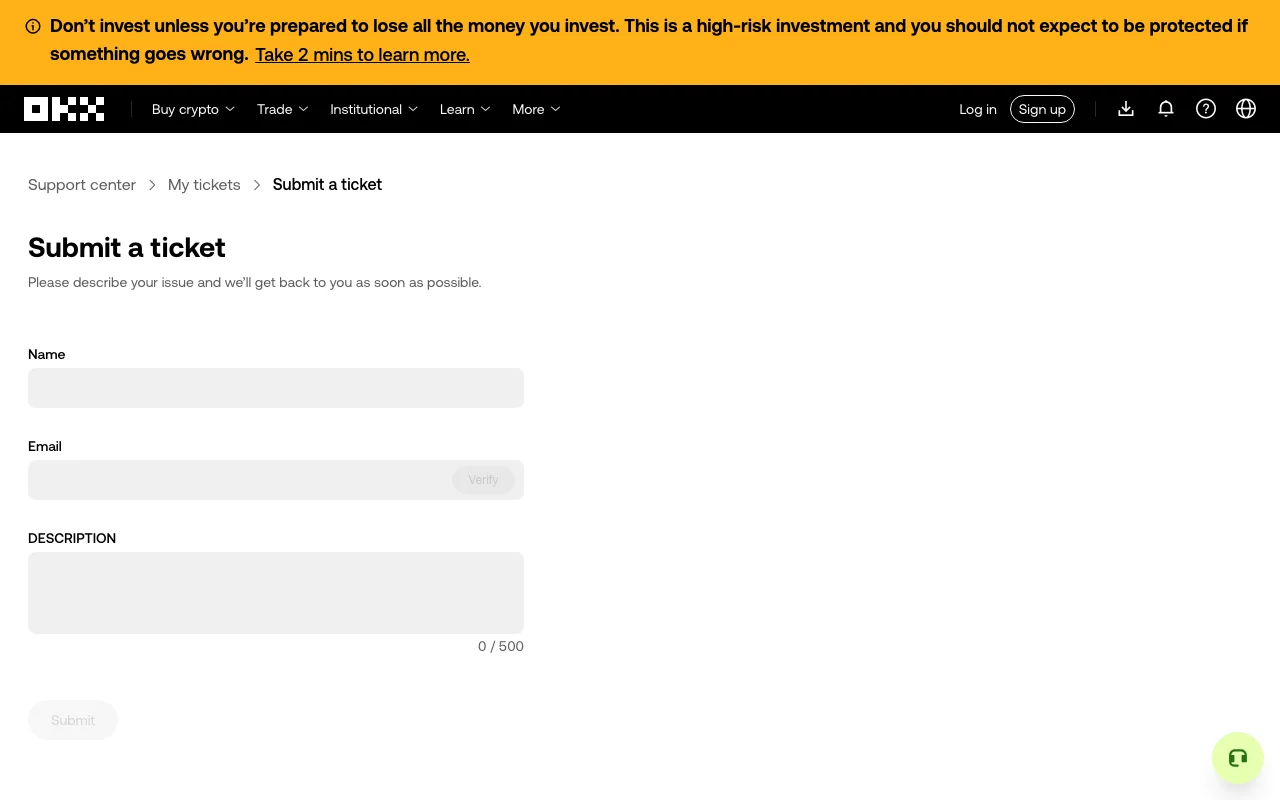
To submit an OKX support ticket, open the official OKX Help Center and ticket links from an address you trust. If a quick tool cannot resolve your issue, use the support option shown there or open OKX’s public Submit a ticket form. The form currently asks for a name, email address, email verification, and a description of up to 500 characters. If you already have a ticket, return to that conversation rather than starting another one.
Checked October 5, 2026: OKX's international Help Center currently presents 24/7 support, quick tools, chat, and a support-ticket area. Labels and available channels can differ by region and whether you are signed in, so follow the controls displayed on your own official OKX page or app.
The public OKX ticket form on October 5, 2026; the fields are empty and no account is signed in.
The safest way to reach OKX customer support
On the web
- Type
okx.cominto the address bar yourself and open Support Center. Do not follow a support link sent in an unsolicited message. - Search for the exact issue first. For common cases such as a missing deposit, delayed withdrawal, security-method change, or account freeze, the Help Center may offer a dedicated tool.
- If the article or quick tool does not solve the problem, choose Chat with us. The OKX Assistant can collect the issue details and direct you to the appropriate support flow.
- If the flow offers Submit a ticket, enter a short description within the form’s current 500-character limit, verify your email if prompted, and save the confirmation or ticket number. Include the key event and reference first; add further evidence in the ticket conversation when that option is available.
- Return to My tickets or Check support tickets inside the Support Center to review replies and continue the same conversation.
In the OKX app
After signing in, open Menu, choose Get help, and use the support or chat option shown there. OKX's current ticket-status instructions say signed-in users can open Check your tickets, select an open or closed request, and reply within the ticket. Menu names may move after an app update, so update the app through its official store if the controls do not match.
If you cannot sign in
Use the guest support route from the official login page or Support Center. According to OKX's current instructions, guest ticket updates are sent to the email address used for the request. The notification contains a unique link to view the ticket, and email verification may be required before the conversation opens.
Do not ask a friend or social-media contact to open an account case for you. Support may only discuss account-specific information with the account holder.
What to include in an OKX support ticket
A useful first message lets an agent identify the event without asking for basic details again. The public form has a short description limit, so prioritize the symptom, time, and reference there. Include only what applies, and provide more detail in the ticket conversation if OKX allows it:
| Detail | Good example | Safety note |
|---|---|---|
| One-sentence summary | "USDT deposit is confirmed on-chain but not credited" | Describe the symptom, not a guess about the cause |
| Date and time | Include the date, time, and time zone | Avoid vague wording such as "yesterday" |
| Product and action | Web or app; login, deposit, withdrawal, P2P, or trading | State the app version and phone model when relevant |
| Reference | Transaction hash, order ID, or ticket number | Check every character before sending |
| Exact error | Copy the message shown on screen | Do not paraphrase an error code |
| Troubleshooting tried | List the steps once, in order | This prevents repeated basic checks |
| Screenshot | Crop to the relevant screen and keep the error visible | Hide email, phone, UID, balances, codes, and unrelated activity |
For a blockchain transfer, state the asset, network, transaction hash, sending platform, destination platform, and confirmation status. Never send a second transfer merely to "test" an address unless the official recovery instructions explicitly require it.
For login or verification trouble, include the method that failed, the exact message, the request time, and whether another method is offered. If the issue is a missing SMS or email, work through the ordered verification-code delivery checklist before opening a duplicate request.
Information OKX support should never need from you
Do not disclose any of the following in chat, a ticket, an attachment, or a screen-sharing session:
- your password, SMS code, email code, or authenticator code;
- a seed phrase, private key, wallet backup, or API secret;
- a payment-card PIN or CVV;
- a remote-control code or permission to operate your device; or
- a transfer to a so-called safe, verification, or unlock address.
An agent may need identity or transaction evidence through an official secured process, but that does not make secret credentials shareable. Before trusting any domain, sender, phone number, or social account, use the checks in how to verify an official OKX channel.
How to check and reply to an existing ticket
For a signed-in web account, open the official Support Center and choose My tickets from the support menu. In the app, use Menu → Get help → Check your tickets. Open the original request to review its history and reply.
For a guest request, open the unique ticket link in the notification email and complete the requested email verification. OKX also documents guest access through Support Center → My tickets or Menu → Get help → My tickets in the app, using the code supplied for the request. Follow the route shown for your region and account. The notification email itself is not the place to reply; respond inside the ticket page.
Keep updates in one ticket whenever possible. Repeated tickets for the same event split the evidence and can make it harder to follow what has already been checked. If a ticket is closed and the issue is still unresolved, the current OKX instructions say to submit a new request and reference the earlier ticket number.
When the issue may be urgent
If you see an unknown login, unauthorized trade, changed security method, or withdrawal you did not request, do not wait for a routine answer before protecting the account. Open OKX directly from a trusted device, use the available account-freeze or security controls, change exposed credentials, and preserve transaction records. Then contact support through the official route.
If someone claiming to be support contacted you first, moved the conversation to a private messenger, requested screen sharing, or asked for an upfront payment, stop responding and verify the contact through the official OKX channel-checking route before taking another action.
Quick answers
Does OKX have live chat?
The public international Support Center currently offers Chat with us and describes support as available 24/7. The actual route and agent availability shown to you can vary by region and issue.
Can I submit an OKX ticket without logging in?
OKX's current ticket guidance describes a guest route through the login page or Support Center. Guest updates go to the email used for the request, and opening the ticket may require email verification.
Where can I see my OKX ticket status?
Signed-in users can use My tickets on the website or Check your tickets under Get help in the app. Guest users normally follow the unique link in the ticket-update email.
Should I open another ticket if there is no immediate reply?
Usually no. Add relevant information to the original open ticket so the history stays together. Create a new request only if the previous ticket is closed or the official flow tells you to do so.
Official sources checked October 5, 2026: the OKX Support Center, the official support-ticket update instructions, and the official ticket submission page. Regional pages, menu labels, and support channels can change; the controls shown on the official page for your account take priority.
This independent guide is for educational purposes and is not affiliated with OKX.
Last updated Oct 5, 2026. OKX may change its app and rules, so always check the official OKX pages before you act. Chinese readers can also see our Binance & OKX beginner guides in Simplified Chinese.