
Comparisons
Before Your First Trade: Exchange Setup and Security Checklist
Registering on your first exchange? Follow this checklist: official-channel verification, registration hygiene, KYC, 2FA, anti-phishing code, withdrawal whitelist, and a small end-to-end test run.
Affiliate disclosure: this article contains a referral link. If you use it, OKSUR may receive a reward. Any offer depends on your eligibility and the current programme terms; a fee discount is not guaranteed.
Before funding a new exchange account, verify the website, protect your sign-in methods, and check the deposit and withdrawal route you intend to use. This checklist helps you work through those setup decisions; it does not remove market, custody, or transaction risks.
Step 1: start from the right entrance
- Type the official URL yourself or get the download link from official channels; verify the domain before registering. Get this wrong and everything after is compromised — see spotting fake apps and phishing sites.
- Check the product and fees available for your region before registering. Our spot and futures fee calculation guide explains how to read the applicable rate and separate trading costs from other charges.
Step 2: registration hygiene, three rules
- Use your primary email, never a throwaway — it is your account-recovery lifeline.
- Unique password: one strong password used nowhere else; a password manager is a good investment.
- Your own phone number, since SMS verification will depend on it.
Step 3: complete KYC
Valid document, good lighting, details entered exactly as printed. Stuck? See KYC verification failed — fixes.
Step 4: security settings (the step that matters most)
- Set up an authenticator app if it is available for your account. Use our OKX authenticator setup guide and store the setup key privately. Test the new method before retiring a working one.
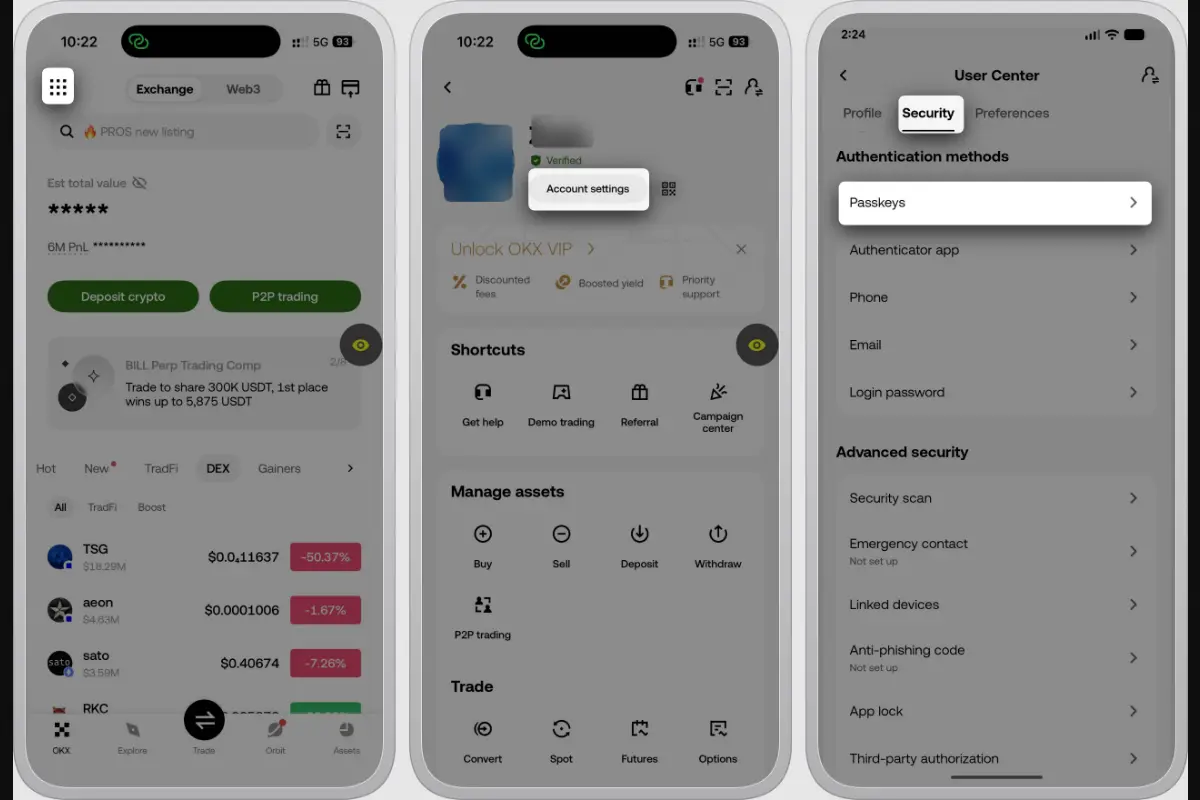
- Check whether a passkey suits your devices. Follow the OKX passkey setup and new-phone troubleshooting guide. An authenticator code and a passkey are different methods; do not reset one to solve a problem with the other.
- Set an anti-phishing code and learn how to check suspicious OKX emails. A missing or unexpected code is a reason to verify the message independently; the presence of a code alone does not make a link safe.
- Review the withdrawal allowlist and the account's address-verification controls. Read how the allowlist and new-address lock work before enabling them. These controls reduce particular risks; they do not guarantee that a compromised account is safe.
- Review linked devices and investigate sessions you do not recognize.
Interface example from the official OKX passkey guide. The source masks account details. Menu names and available controls may differ by regional product and app version; see the official account-security guide for context.
Step 5: run the full loop with a small amount
If you decide to proceed, test the intended deposit and withdrawal route with a small amount that meets the applicable minimums. Confirm the receiving network, address, and any memo before sending. A successful small test does not guarantee that a later transfer will be problem-free. Details are in the deposit guide and withdrawal guide.
If a credited deposit is not available on the order screen, check Funding versus Trading accounts and how transfers work. Identify where the balance is held before sending another deposit.
Three rules for your beginner phase
- No leverage or futures until you can explain liquidation and funding rates from memory.
- Only money you can afford to lose.
- Treat every unsolicited "support agent," "mentor," or "insider tip" as a scam — see 7 signs of fake support.
A note on sign-up fee discounts
If you choose to use our optional OKX registration referral link, read the offer and regional eligibility shown before registering. Do not assume the code changes your published maker/taker rate or guarantees a rebate. OKX's regional fee guidance distinguishes fee-tier rules from programme rebates. Compare the current terms with your own needs rather than opening an account solely for an advertised reward.
Risk note
Crypto prices are highly volatile. Educational content only, not financial advice.